





Your shopping cart is currently empty...
Published: October 1, 2026

Start With the Equipment
Passwords, firewalls, and software updates are familiar parts of network security. The switches, servers, patch panels, and recording equipment behind those systems need protection, too.
Picture a network cabinet in the back room of a retail store. Several people use the room, but only a few need access to the equipment. If the cabinet is left open and the key stays in the lock, anyone entering that space can reach the connections inside.
October is Cybersecurity Awareness Month, making it a good time to ask a practical question: Who can get their hands on your network?
Start here: Look at who can enter the equipment area, what they can reach, and how access is managed after installation or service.
Small Access Gaps Can Cause Big Disruptions
An employee disconnects the wrong cable while moving supplies. Someone makes an equipment change without checking with IT. A cabinet door stays open after a service visit.
These situations can interrupt the systems a business relies on. Intentional tampering is another concern when equipment is within easy reach.
A properly selected and secured cabinet helps limit casual access and accidental contact with the equipment inside. It adds a physical layer of protection alongside controlled room access, sensible key management, and the network's other security measures.
Match the Cabinet to the Space
The right enclosure depends on what needs protection, where it will be installed, and how authorized technicians will service it. Vericom offers options for smaller wall mount installations through larger network and server environments.
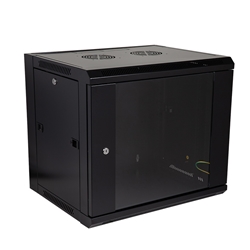
Compact equipment housing for smaller installations.
Smaller installations
Protect Equipment in Shared Spaces
For a small network, security, or AV installation with limited space, the VW8 Series Wall Mount Cabinet provides a compact enclosure with a locking front door and adjustable mounting rails.
It gives compatible equipment a dedicated place in offices, retail back rooms, and other areas where a full-size cabinet may not be practical. Confirm usable depth, equipment weight, and cooling needs when selecting the configuration.
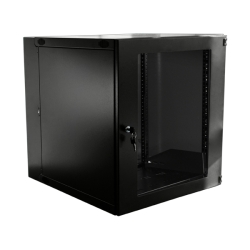
Swing-out rear access for installation and maintenance.
Access for maintenance
Make Service Access Easier
Security needs to work with everyday maintenance. The VW1 Series Double Hinge Wall Mount Cabinet combines a lockable front door with a swing-out rear section that gives technicians convenient access to equipment and cabling.
That access helps when installing, tracing, or changing connections. Plan enough clearance for the cabinet to swing open, and make closing and securing it part of every completed service visit.
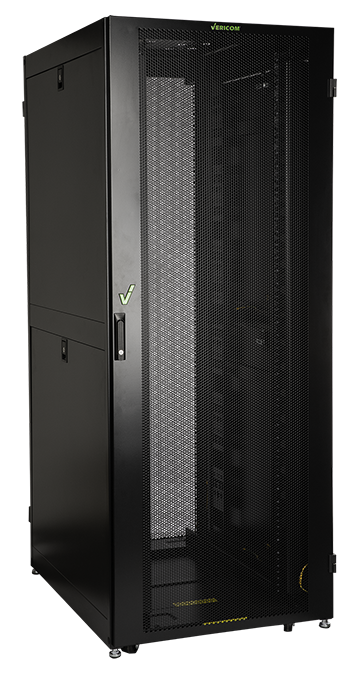
Lockable doors and side panels for larger installations.
Larger equipment environments
Look Beyond the Front Door
In a network or server room, access can come from several sides. The VC5 Series Cabinet Platform includes lockable front and rear doors and removable, lockable side panels.
Multiple cabinet sizes and configurations help match the enclosure to the equipment. Cable management and thermal management accessories support an organized installation with room for routing, airflow, and service.
When reviewing security, check the complete enclosure and how it is being used. A locked front door is only one part of managing physical access.
Separate users, separate access: In a shared hosting environment, the VC5 Series Colocation Cabinet provides two tenant compartments with individual combination locks and a key override for facility personnel. Each tenant can access their own compartment while the facility retains overall access.
Keep Security Practical
A cabinet should support the equipment's operation as well as its protection. Check usable depth, load capacity, ventilation, cable entry, and room for service before choosing a model.
If doors are being left open because cables are crowded or equipment is difficult to reach, review the layout and cabinet selection. A workable setup makes it easier to close and secure everything after the job is done.
A Quick Physical Access Check
- Who can enter the equipment area, and who needs cabinet access?
- Are doors and removable access panels secured where designed to lock?
- Are cabinet keys or combinations limited to authorized people?
- Can the doors close properly with all equipment and cables in place?
- Is there adequate airflow and room for maintenance?
- Does every service visit end with the cabinet secured?
Make the Next Upgrade a More Secure One
Whether you are planning a new installation or improving an existing one, start with the equipment, the available space, and the people who need access.
Talk with your Vericom distributor about the right cabinet and accessories for your project. Our team can also help identify suitable options based on your equipment dimensions, installation space, and access requirements.